
How to Maintain Solar Generator Equipment and Why Almost Zero Is Not Zero
Knowing how to maintain solar generator equipment is the difference between a unit that lasts 3 years and one that lasts 10. Solar generators need no oil changes, no spark plugs, no fuel stabilizer, and no carburetor cleaning. Compared to a gas generator that demands attention every 50 to 100 hours of runtime, a solar generator asks for almost nothing. That word “almost” is where most owners get into trouble.
Three rules determine whether a solar generator reaches its rated 3,500+ cycle lifespan or dies within two winters. First, storage SOC must stay between 50 and 80 percent during any period longer than 30 days. Second, cooling vents must be cleaned with compressed air every 6 months. Third, firmware updates must be checked quarterly through the manufacturer app. Neglecting any one of these three can permanently disable the unit.
The cost of neglect is not a gradual decline. It is a sudden, irreversible failure. A single cell dropping below the low-voltage safety floor triggers a permanent BMS lockout. A blocked vent triggers thermal shutdown at high loads. A missed firmware update causes false SOC readings that mimic battery failure. Every one of these failures is preventable with less than 30 minutes of maintenance per year. For a broader look at solar generator options in Ontario, see our solar generator Ontario guide.
The Maintenance Comparison Table for Solar Versus Gas Generators
Gas generators require mechanical maintenance on a fixed schedule. Oil changes every 50 to 100 hours prevent engine seizure. Spark plug replacement every 200 hours maintains ignition. Fuel stabilizer must be added at every fill to prevent carburetor gumming during storage. Carburetor cleaning is required annually even with stabilizer. Pull-start cord and air filter inspections round out the list. For a gas generator that runs 200 hours per year, that is 4 oil changes, 1 spark plug, 12 fuel treatments, and 1 carburetor cleaning. For more on this comparison, see our solar generator versus gas generator comparison.
| Maintenance Task | Gas Generator | Solar Generator |
|---|---|---|
| Lubrication | Oil change every 50-100 hours | None |
| Ignition | Spark plug every 200 hours | None |
| Fuel System | Carburetor cleaning annually | None |
| Cooling | Clean radiator annually | Wipe vents every 6 months |
| Software | Manual adjustments only | Firmware updates via app |
| Storage | Drain fuel or add stabilizer | Maintain 50-80% SOC |
The solar generator column is shorter because the maintenance list is shorter. The total annual time investment for a solar generator is approximately 30 minutes. The total annual time investment for a gas generator is 4 to 6 hours plus the cost of oil, filters, plugs, and stabilizer. The how to maintain solar generator checklist fits on a sticky note. The gas generator checklist fills a service manual.
How to Maintain Solar Generator Battery Storage and the SOC Rules
Never store a solar generator at 0 percent SOC. Most LFP units self-discharge at 2 to 3 percent per month. A unit stored at 10 percent SOC in October will reach 0 percent by January. At that point, a single cell can drop below the low-voltage safety floor of approximately 2.5V per cell. The BMS detects the imbalance and permanently disables the unit to prevent a thermal event. This damage is not recoverable. The unit is dead. For more on cycle life, see our solar battery lifespan guide.
Never store at 100 percent SOC either. Full charge accelerates calendar aging inside LFP cells, especially in cold temperatures. A unit stored at 100 percent in a shed that drops to minus 15 degrees C experiences faster internal resistance growth than the same unit stored at 60 percent in a heated basement. The correct storage range is 50 to 80 percent. Recharge every 3 to 6 months during storage to prevent drift below the safe floor. This is the single most important rule in knowing how to maintain solar generator equipment for long-term ownership. For more on LFP chemistry, see our LFP battery maintenance guide.
Vent Cleaning, Port Inspection, and the Thermal Shutdown Risk
Solar generator cooling fans exist to dissipate heat from the inverter during AC output. At loads above 200W, the fans activate. At loads above 1,000W, the fans run at full speed. If dust, pet hair, or debris blocks the intake or exhaust vents, airflow drops. The inverter temperature climbs. At a manufacturer-defined thermal threshold, the BMS triggers a protective shutdown that cuts all output instantly. This shutdown is not a malfunction. It is the unit protecting itself from heat damage.
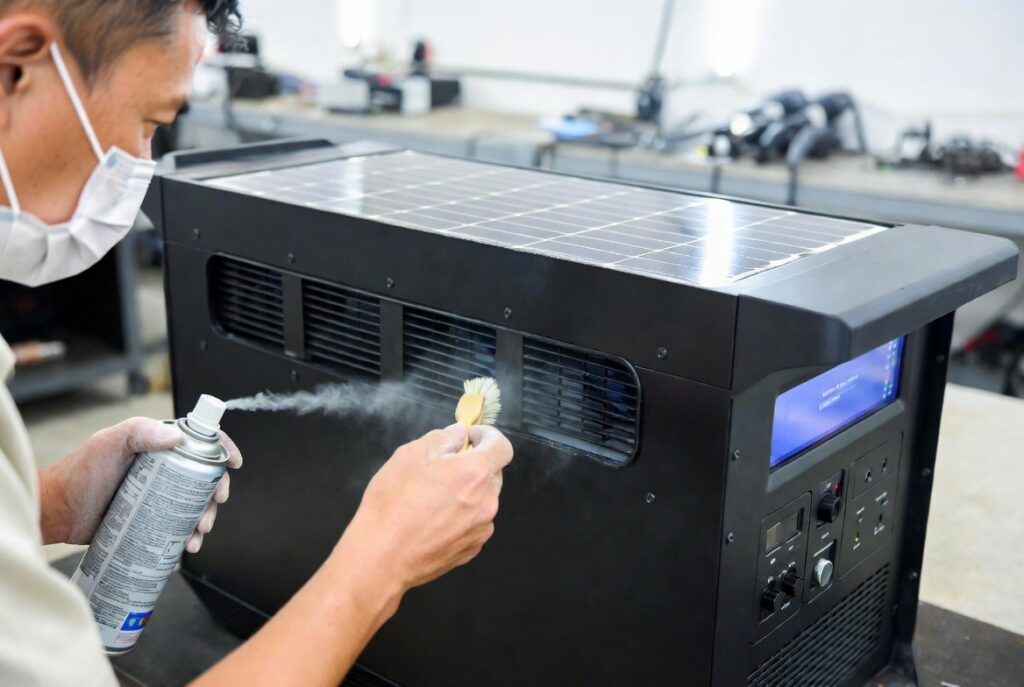
The fix is 5 minutes of compressed air every 6 months. Blow out the cooling vents on all sides. Inspect the AC and DC output ports for dust buildup, bent pins, or corrosion. Inspect the MC4 solar input port for oxidation on the contacts. A corroded MC4 port reduces solar charging current without triggering an error code. The unit simply charges slower and the owner assumes it is a cloudy day. Clean contacts prevent intermittent failures that are difficult to diagnose without a Victron SmartShunt or similar monitor.
The Grey County Cold Storage Failure
A cottage owner in Grey County bought a top-tier 2,000Wh solar generator and charged it to 100 percent SOC before closing the cottage for winter. He stored it in an unheated shed where temperatures dropped to minus 15 degrees C through January and February. He assumed a full charge meant the unit was ready for spring. He did not bring the unit indoors or reduce the SOC before storage.
When he returned in April, the unit would not power on at all. Storing the battery at 100 percent in freezing temperatures accelerated calendar aging inside the cells. A tiny parasitic drain from the internal clock and BMS pulled a single cell below the low-voltage safety floor over 5 months. The BMS permanently disabled the unit to prevent a thermal event from an unbalanced cell.
The unit was not recoverable. A $2,000 generator lasted 7 months because of one storage mistake. Storing a battery at 100 percent in the cold is like leaving a parking brake engaged for six months in freezing rain. Eventually the mechanism corrodes and seizes, and no amount of force will release it. The correct protocol is to store at 50 to 80 percent SOC in a space that stays above 0 degrees C.
The Haliburton Firmware Save
A client in Haliburton complained that his 2,000Wh solar generator was displaying erratic SOC readings. The screen would jump from 40 percent to 5 percent in minutes during normal use. He was convinced the battery cells were failing after only 14 months of ownership. He was preparing to file a warranty claim and buy a replacement.
The battery was perfectly healthy. A pending BMS calibration firmware update had been waiting in the manufacturer app for 3 months. The old firmware had a bug in how the SOC algorithm interpreted cell voltage curves during partial discharge cycles. The display was lying about the remaining capacity, not the battery itself.
After downloading the 2-minute firmware update and running one full 0 to 100 percent calibration charge cycle, the SOC readings returned to normal. The unit showed 96 percent of original capacity after 14 months. Skipping a firmware update on a solar generator is like ignoring a Technical Service Bulletin on your car. The engine runs fine, but the computer needs the latest calibration tables to report accurate data to the dashboard. Checking for firmware updates quarterly takes 30 seconds and can save a warranty claim.
How to Maintain Solar Generator for Ontario Seasons and the Storage Protocol
Winter storage from November through March requires bringing the unit indoors. Any space that stays above 0 degrees C works. A basement, a heated closet, or even a corner of the kitchen. Set the SOC to 60 percent before storage. Mark your calendar to recharge to 60 percent again in January. The total winter maintenance time is 20 minutes across 5 months. Leaving the unit in an unheated shed, garage, or cottage is the number one cause of premature solar generator failure in Ontario. For the full winterization protocol, see our solar winterize guide.
Spring commissioning in April takes 15 minutes. Charge the unit to 100 percent, then discharge under a test load to verify the inverter fires correctly. Blow out the cooling vents with compressed air. Clean all ports. Check the manufacturer app for firmware updates. Run the unit at 500W for 10 minutes to confirm the fans activate and cool properly. Summer maintenance is limited to avoiding rapid temperature transitions. Moving a unit from a 20 degrees C air-conditioned room to 35 degrees C humid outdoor air can cause condensation inside the ports. Wait 30 minutes before powering on if the surface feels cold to the touch. For the full seasonal protocol, see our solar maintenance guide.
Frequently Asked Questions
Q: Can I leave my solar generator plugged in all the time?
A: Most modern units from Anker, Bluetti, and EcoFlow have bypass modes, but for maximum lifespan, unplug at 80 to 90 percent. Leaving a unit at 100 percent for months degrades LFP cycle life faster than normal use. Treat it like a laptop battery and avoid permanent trickle charging.
Q: What happens if I store it at 0 percent?
A: The battery self-discharges at 2 to 3 percent per month. Over 3 to 6 months, a cell can drop below the low-voltage safety floor. The BMS will permanently disable the unit to prevent a thermal event, and this damage is not recoverable.
Q: Do I need to clean the solar panels too?
A: Yes. A thin layer of Ontario pollen or dust can reduce panel efficiency by 15 percent. Wipe with a damp microfibre cloth and never use harsh chemicals. Clean panels once per season for optimal solar input.
NEC Article 480 covers stationary and portable battery storage systems including ventilation, thermal management, and overcurrent protection requirements. Section 480.26(B) specifies that storage areas must be dry and well-ventilated to prevent moisture damage. Current standards are published at nfpa.org.
CEC Section 64 governs portable power equipment storage and thermal safety requirements in Ontario. All solar generators must be stored in dry, ventilated spaces free from extreme temperatures. The Electrical Safety Authority (ESA) provides current compliance information and storage guidelines at esasafe.com.
This build is engineered within the 48V DC Safety Ceiling. Diagnostic logic is based on 20+ years of technical service experience. All structural and electrical installations must be verified by a Licensed Professional and comply with your Local AHJ. See our legal and safety disclosure for full scope.
About the Author
Robert Bertrand spent 20 years as a service advisor in the automotive industry (Lexus and Nissan), where precision diagnostics, wiring integrity, and documentation standards were non-negotiable. He brings that same technical discipline to GridFree Guide, where he researches, tests, and documents off-grid solar systems for Ontario conditions. Based in Rockwood, Ontario, every article is built on verified specifications, manufacturer data, and the real-world climate constraints of Canadian off-grid living.
As an Amazon Associate I earn from qualifying purchases. This site also contains affiliate links to other products and services. GridFree Guide earns a small commission at no extra cost to you.