
The Solar Generator Elderly Standard and Why Simplicity Is the Only Spec That Matters
Choosing a solar generator elderly parents can operate independently is the difference between backup power that works during an ice storm and a $2,000 box that sits unused in the closet. The buyer is technical. The user is not. An ice storm is a high-stress emergency for a senior living alone in Ontario. The unit must operate with one button, weigh under 30 lbs, and require zero configuration at the moment of use.
Pre-delivery setup by the adult child is the critical variable, not the unit’s specifications. A $4,500 unit with a complex LCD screen is worthless if the 82-year-old user cannot navigate the overload reset procedure at 2 AM during a blackout. A $400 unit with a labeled power button and a one-page instruction card keeps the lights on. The solar generator elderly parents need is the simplest one, not the most powerful one.
This article covers the simplicity requirements for non-technical users, the pre-delivery setup checklist that turns a tech product into a household appliance, and which units fit each senior profile. For a broader overview, see our solar generator Ontario guide.
The Simplicity Requirements and What to Look for in a Unit for Non-Technical Users
One-button AC activation is the minimum requirement. The unit must have a physical power button that turns on the AC outlets with a single press. No menu navigation. No app required to activate output. Under 30 lbs ensures the user can move the unit from the closet to the kitchen or bedroom without help. Most seniors cannot safely lift more than 30 lbs, which eliminates every unit in the 2,000Wh class and above.
UPS mode is essential for CPAP users. The unit stays plugged into the wall with the CPAP plugged into the unit. When grid power fails, the unit switches to battery in under 20ms. The CPAP never stops. The user never wakes up. Remote monitoring via Bluetooth or WiFi app lets the adult child check the battery level from across town without calling. LFP chemistry provides safe long-term indoor storage with no maintenance between visits.
The Recommended Units for Elderly Users and Why Lighter Is Better
The three units below cover every senior backup power scenario from bedside phone charging to overnight CPAP operation. Weight is listed first because it is the most important spec for this user group. A unit the parent cannot lift is a unit they cannot use.
| Unit | Weight | Best For | Key Feature |
|---|---|---|---|
| EcoFlow RIVER 2 | 7.7 lbs | Bedside backup | Lightest option available |
| Jackery Explorer 300 Plus | 8.3 lbs | Phones, lights, radio | Simplest interface |
| Anker SOLIX C1000 | 28 lbs | CPAP, TV, small kettle | UPS mode and quiet mode |
The EcoFlow RIVER 2 at 7.7 lbs fits on a nightstand and charges a phone 20+ times. The Jackery Explorer 300 Plus at 8.3 lbs has the simplest interface of any unit on the market. The Anker SOLIX C1000 at 28 lbs is the heaviest but offers UPS mode for CPAP and the longest runtime at 1,056Wh. For more lightweight options, see our best small solar generator guide.
The Solar Generator Elderly Setup Checklist and What to Do Before You Deliver It
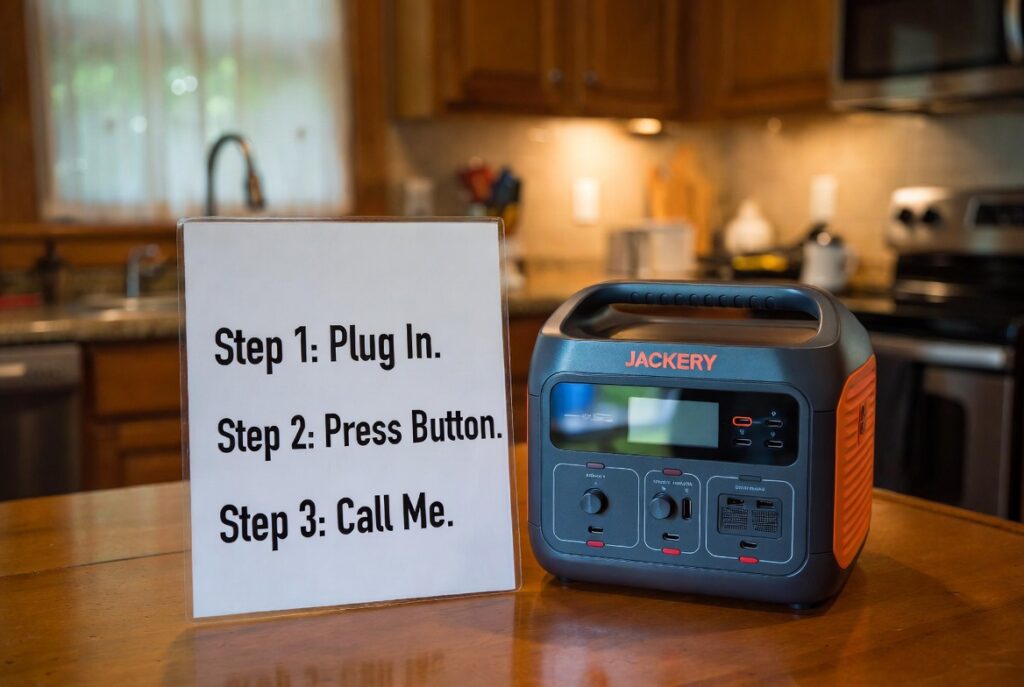
Charge the unit to 100 percent before delivering it. Label the AC power button with large text reading ON and OFF using a label maker or adhesive letters. Place stickers directly over the outlets the parent will use: PLUG CPAP HERE on outlet one, PLUG LAMP HERE on outlet two. Print a one-page instruction card in 18-point font with three steps: Step 1 Plug In, Step 2 Press Button, Step 3 Call Me. Laminate the card and store it on top of the unit.
Test every device the parent will use while they watch. Plug in their CPAP, their bedside lamp, and their phone charger. Show them which outlet each device goes into. Let them press the power button themselves at least twice so the muscle memory is established before the emergency. Set a calendar reminder to visit every 90 days, check the SoC, and top up to 100 percent. For ongoing care, see our solar generator maintenance guide.
The Milton Labeled Outlet Victory
A woman in Milton bought an Anker SOLIX C1000 for her 82-year-old father who lives alone. Instead of handing him the box, she spent one hour setting up the unit at his kitchen table. She used a label maker to mark the AC power button with large text reading ON and OFF. She placed stickers over two of the outlets reading PLUG CPAP HERE and PLUG LAMP HERE.
During a 6-hour outage in November, her father did not call her in a panic. He followed the sticker labels, pressed the button marked ON, plugged in his CPAP and bedside lamp, and went back to sleep. She checked the Anker app from her phone across town and saw the unit at 72 percent with two active loads totaling 35W. The solar generator elderly setup she built turned a potential emergency into a non-event for an 82-year-old living alone.
Setting up a solar generator elderly parents can use is like programming the Home button on a GPS before handing them the keys. You remove the search, the configuration, and the decision-making from the moment of stress. They press one button and the system takes them where they need to go. The $20 label maker and 60 minutes of setup time were worth more than the $900 unit itself.
The Rockwood Overpowered Confusion
A son in Rockwood bought his parents an 80 lb professional-grade unit with a complex LCD screen displaying frequency, amperage, and input/output waveforms. He chose the biggest unit available because he wanted them to have maximum capacity. He delivered the box, showed them the power button, and left. He did not label anything or create an instruction card.
When the power went out, his parents plugged in a 1,500W space heater. The unit displayed an overload warning and shut down. They did not understand the error message on the LCD screen. They could not find the reset procedure because the manual was still in the box. They sat in the dark for 4 hours with $3,000 of backup power sitting 5 feet away because the interface was too complex for them to troubleshoot under stress.
Giving an elderly parent a complex solar generator is like handing a teenager the keys to a manual transmission car during their first drive in a snowstorm. If the interface is too complicated, they stall and sit still. The unit was not defective. The setup was wrong for the user. A simpler $400 Jackery Explorer 300 Plus with labeled outlets and a one-page instruction card would have kept the lights on. The best solar generator elderly parents can use is the simplest one, not the biggest one.
The Solar Generator Elderly Verdict and Which Unit Fits Each Senior Profile
This solar generator elderly verdict splits into three profiles based on the senior’s medical needs, living situation, and proximity to help.
- Seniors who need bedside backup for phones, a lamp, and a radio should get an EcoFlow RIVER 2 at 7.7 lbs or a Jackery Explorer 300 Plus at 8.3 lbs. Either fits on a nightstand. Both operate with one button. Both run a phone charger and LED lamp for 2+ days on a single charge. For CPAP without humidifier, see our solar generator for CPAP guide.
- Seniors with CPAP machines who cannot tolerate any power interruption should get an Anker SOLIX C1000 with UPS mode. Leave it plugged into the wall with the CPAP plugged into the unit. The 20ms switchover keeps the CPAP running through the outage without waking the user. Enable quiet mode via the app before delivery. For long-term storage care, see our solar generator lifespan guide.
- Rural Ontario seniors where power may be out for 24+ hours and roads may not be cleared should get an Anker SOLIX C1000 at 1,056Wh for maximum runtime on a single charge. Set up remote monitoring on your phone so you can check their battery level from across town. Visit every 90 days to check SoC and verify the unit is charged. The solar generator elderly protocol for rural parents is monitoring plus maintenance, not a larger unit.
Frequently Asked Questions
Q: Are solar generators safe for oxygen concentrators?
A: Yes, but check the startup surge requirement of the concentrator. Most medical oxygen concentrators draw 300W to 500W continuous, which the Anker C1000 at 1,800W handles easily. Verify with the concentrator manufacturer that a pure sine wave inverter is approved for their unit.
Q: Can the unit stay plugged into the wall permanently?
A: Yes, and this is the recommended configuration for elderly users. The BMS prevents overcharging and keeps the unit at 100 percent ready for instant deployment. Units with UPS mode provide automatic switchover when grid power fails without any user action required.
Q: Will it make noise that disturbs sleep?
A: Most units are silent when the load is below the fan activation threshold. The Anker C1000 has a quiet mode that reduces fan speed at the cost of slightly reduced output. At a CPAP load of 8W to 50W, the fans rarely activate on any unit in this class.
NEC Article 702 covers optional standby systems including portable power equipment used for medical device backup. All backup power equipment connected to medical devices must provide clean pure sine wave output. Current standards are published at nfpa.org.
CEC Section 64 governs portable power equipment safety requirements for residential use in Ontario. All units used for medical device backup must be CSA or UL certified. The Electrical Safety Authority (ESA) provides current compliance guidelines and medical device backup resources at esasafe.com.
This build is engineered within the 48V DC Safety Ceiling. Diagnostic logic is based on 20+ years of technical service experience. All structural and electrical installations must be verified by a Licensed Professional and comply with your Local AHJ. See our legal and safety disclosure for full scope.
About the Author
Robert Bertrand spent 20 years as a service advisor in the automotive industry (Lexus and Nissan), where precision diagnostics, wiring integrity, and documentation standards were non-negotiable. He brings that same technical discipline to GridFree Guide, where he researches, tests, and documents off-grid solar systems for Ontario conditions. Based in Rockwood, Ontario, every article is built on verified specifications, manufacturer data, and the real-world climate constraints of Canadian off-grid living.
As an Amazon Associate I earn from qualifying purchases. This site also contains affiliate links to other products and services. GridFree Guide earns a small commission at no extra cost to you.