
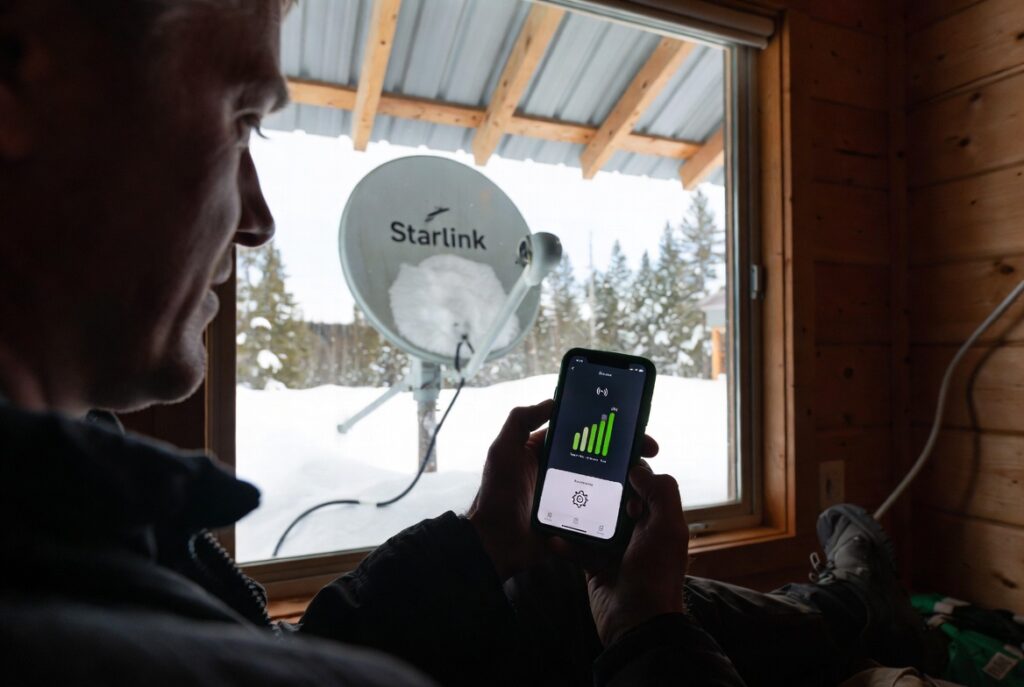
The most common off grid internet mistake in Ontario is plugging in a Starlink Standard dish and walking away from the default settings, because Starlink ships with snow melt mode set to automatic, no sleep schedule configured, and power routing through the AC adapter, a combination that draws approximately 135W around the clock in Ontario January conditions and will drain a standard 200Ah LFP battery bank to the low voltage disconnect threshold before 3:00 AM.
A property owner on Edinburgh Road in Guelph, Wellington County installed Starlink as the primary off grid internet connection for her year-round cabin in fall 2022. Her battery bank was 200Ah LFP at 12V, correctly sized for her 480Wh daily cabin load. She installed Starlink, pointed the dish, and confirmed a strong connection before leaving the cabin for three weeks. When she returned in January, her Victron SmartShunt showed a history of repeated low voltage disconnect events beginning approximately 12 hours after each departure.
She contacted me after the third LVD event. Her SmartShunt logs confirmed the failure: the Starlink dish was drawing approximately 135W continuously, including snow melt mode running at approximately 100W on top of the dish’s 35W operating draw. Her 200Ah LFP bank at 12V provides approximately 1,920Wh of usable capacity at 80% DoD. At 135W continuous draw from the Starlink alone, plus her 480Wh daily cabin load distributed across 24 hours, the bank was depleted within approximately 9 hours of a fully charged state. Snow melt mode was running even on nights when the temperature was -2°C with no active snowfall.
I specified three changes made in 15 minutes via the Starlink app: snow melt mode set to off, sleep schedule configured for 11:00 PM to 6:30 AM, and the dish power routing changed to a DC PoE injector to eliminate the inverter idle draw. The combined daily Starlink draw dropped from approximately 3,240Wh to approximately 730Wh. Her SmartShunt confirmed the correction immediately: the bank maintained above 55% SoC through the remainder of that January, with no LVD events after the setting changes. The off grid internet problem was a configuration problem, not a capacity problem. See our Ontario solar sizing guide before sizing any battery bank that will carry an off grid internet load.
The off grid internet power problem: why Starlink’s default settings are configured for the grid, not a battery bank
| Setting | Default (factory) | Optimized (off grid) | Ontario verdict |
|---|---|---|---|
| Snow melt mode | Automatic (always on in frost) | Off | Saves 80-120W continuous ✓ |
| Sleep schedule | None (24/7 active) | 11 PM to 6:30 AM sleep | Saves ~270Wh per night ✓ |
| Power routing | AC inverter path | DC PoE injector | Eliminates 15-20W idle draw ✓ |
| Router | Stock (~18W) | 12V travel router (~6W) | Saves ~240Wh per day ✓ |
| Daily total | ~3,240Wh | ~730Wh | 77% reduction, no hardware upgrade ✓ |
Starlink default settings destroy off grid internet battery banks through three simultaneous draws. Snow melt mode adds approximately 80 to 120W (100W typical) to the dish’s 35 to 50W operating draw, producing approximately 135W combined. At 135W continuous over 24 hours = 3,240Wh per day. A 200Ah 12V LFP bank has 1,920Wh of usable capacity at 80% DoD. Even without any other cabin load, Starlink default settings drain the bank in approximately 14 hours. With a typical Ontario cabin load of 480Wh per day distributed at 20W average, total draw reaches 155W and the bank depletes in approximately 12 hours.
The inverter idle draw is the second hidden load in any off grid internet installation. Running Starlink through a standard PSW inverter adds the inverter’s idle draw, approximately 15 to 20W running continuously even when the Starlink is in sleep mode. A DC PoE injector eliminates this entirely, connecting the 12V or 24V battery bank directly to the dish’s Ethernet port and bypassing the inverter for the Starlink circuit. The Edinburgh Road Guelph system combined snow melt elimination, sleep schedule, and DC PoE to drop from 3,240Wh to 730Wh per day, a reduction achieved with no hardware upgrades to the panel array or battery bank.
The three settings that fix Starlink power consumption in 15 minutes
Snow melt mode is Setting 1. Open the Starlink app, navigate to Settings, then Snow Melt, and set it to Off. This eliminates approximately 80 to 120W of continuous heater draw. In Ontario, a correctly tilted dish clears naturally within 30 minutes of sun exposure after snowfall, the heater is rarely necessary except during active heavy snow. Disabling snow melt reduces the 24-hour draw from approximately 3,240Wh to approximately 960Wh on a Standard dish running continuously with no sleep schedule.
The sleep schedule is Setting 2. Navigate to Settings, then Sleep Schedule, and set the overnight window to 11:00 PM to 6:30 AM. Saves approximately 270Wh per night at 40W operating versus 4W sleep average. Setting 3 is the stock router replacement, the included Starlink router draws approximately 15 to 20W continuous; a 12V travel router draws 5 to 8W, saving approximately 240Wh per day. Combined, the three settings reduce daily Starlink draw from approximately 3,240Wh to approximately 730Wh, a 2,510Wh reduction achieved entirely through configuration and one router swap.
The same 200Ah LFP bank that failed to survive a single night on default settings covers approximately 2.6 days of optimized off grid internet operation. See our Starlink off grid guide for the detailed DC PoE injector installation and router replacement procedure.
Pro Tip: Confirm the optimization worked by checking the SmartShunt before and after the setting changes. Record the average draw for 30 minutes with default settings (the SmartShunt current display shows real-time amps), then apply all three changes and record again 30 minutes after the sleep schedule takes effect for the first time overnight. The Edinburgh Road Guelph system went from 135W confirmed on the SmartShunt display to 4W during the sleep window, a before/after comparison that documents the exact savings for that specific dish, firmware version, and ambient temperature. If the draw after changes is still above 50W during the sleep window, confirm the sleep schedule saved correctly in the app.
Why Starlink is the only viable option for rural Wellington County
Starlink is the only off grid internet option for most rural Wellington and Halton County properties that delivers consistent speeds for daily work. Cable and DSL infrastructure does not reach most rural Ontario properties more than 2 kilometres from a population centre. Cellular LTE coverage in Wellington County is inconsistent, properties near Guelph and Rockwood may have adequate 4G LTE signal, but properties further north or east in the county may have 2 bars or less. At 2 bars of LTE with 25GB monthly data, a work-from-home property owner running video calls and cloud software will hit the throttle threshold within 2 to 3 weeks of the billing cycle, as the Rockwood result documented.
Satellite internet alternatives to Starlink, HughesNet and Viasat, are available in Ontario but carry significantly higher latency (600 to 800ms versus Starlink’s 25 to 50ms) that makes video calls and real-time applications effectively unusable. For any Ontario off-grid property where consistent off grid internet is required for work, Starlink is the only specification that meets the performance requirement. The monthly cost, approximately $120 to $140 CAD in 2025, is the primary ongoing off grid internet expense and must be included in the system’s operating cost calculation alongside battery replacement and any propane costs. See our off grid costs guide for the Starlink monthly fee in the full operating cost calculation.
The off grid internet gray streak protocol: cellular fallback, SmartShunt trigger, and the SOLIX isolation strategy
The gray streak protocol for off grid internet divides the Starlink load into two categories: essential connectivity (email, messaging, light browsing at approximately 5 to 10W effective draw during off-hours) and full throughput (video calls, streaming, file transfers at the full 40W dish operating draw). During a gray streak when the SmartShunt reads below 40% SoC, the protocol is to switch to cellular hotspot for essential connectivity, pause all high-bandwidth tasks (video calls, streaming, and large file uploads), and allow the battery bank to recover before resuming Starlink operation. The cellular hotspot draws approximately 5 to 8W versus Starlink’s 40W active draw, the substitution reduces the connectivity load by approximately 80% during the bank’s lowest point.
A property owner on Wellington Street West in Rockwood, Wellington County specified Starlink as the primary off grid internet connection for his year-round home office in spring 2023. His initial plan was to use a cellular hotspot as primary to avoid the Starlink monthly fee. His rural Wellington County location receives approximately 2 bars of LTE, and his workday involves video calls, large file uploads, and cloud-based software.
By day 18 of his first month, his 25GB cellular data allowance was consumed and his connection throttled to approximately 1.5Mbps, insufficient for any video call. I specified Starlink as the primary off grid internet connection with optimized settings and retained the cellular hotspot as a gray streak fallback. His protocol: SmartShunt below 40% SoC during a gray streak, switch to cellular for email and messaging only, pause video calls until the bank recovers.
His cellular data usage since the protocol change: approximately 2 to 4GB per month, entirely during gray streak periods. His comment: “The hotspot is there for when the sun doesn’t show up. Starlink handles everything else.” See our solar charge controller guide for the MPPT sizing that must account for the off grid internet load in the daily harvest calculation.
The Anker SOLIX C1000 Gen 2 is the isolation strategy for properties where off grid internet continuity is non-negotiable, a home office that cannot afford any internet interruption during a gray streak. The SOLIX C1000 (1,056Wh capacity) placed on a dedicated charging circuit from the main solar array powers the optimized Starlink load (730Wh/day) for approximately 1.4 days standalone. During a gray streak, the main house bank handles cabin loads and the SOLIX handles the Starlink circuit, preventing the Starlink draw from competing with critical loads for the remaining bank capacity above the LVD threshold.
Safety Note: DC PoE Wiring. When using a DC PoE injector to power a Starlink dish, select a unit rated for the dish’s operating voltage and current , typically 56V at 2 to 3A for Standard and High Performance dishes. Use appropriately fused and sized wire from the battery bank to the injector. Incorrect voltage or missing overcurrent protection can cause overheating or fire. All permanent DC wiring in a habitable structure must comply with CEC Section 64 and ESA requirements in Ontario.
NEC and CEC: Ontario permit requirements for permanent off-grid internet installations
NEC 690 governs the solar PV system that powers any off grid internet installation, and NEC 830 governs the network-powered device circuits including the PoE injector and its DC output wiring to the Starlink dish. The DC circuit from the battery bank to the PoE injector must be appropriately fused and rated for the maximum continuous current draw. A 48V PoE circuit for a Starlink Standard dish drawing approximately 50W at full operation: 50 divided by 48 = approximately 1.05A continuous, a 5A fused DC circuit is the correct minimum specification. Contact the NFPA at nfpa.org for current NEC 690 and NEC 830 requirements for DC-powered network device installations in off-grid residential applications.
CEC Section 64 governs electrical installations in Ontario. A permanently wired DC PoE injector connected to the battery bank in a habitable structure is part of the solar electrical system and covered under the ESA permit for that system. Any dedicated DC circuit added for the Starlink installation, including a switched outlet, fuse block branch, or direct DC cable, must be identified in the ESA permit application as a DC load circuit. A Starlink dish powered through a plug-in inverter and standard outlet does not require a separate permit beyond the existing solar system permit. Contact the Electrical Safety Authority Ontario at esasafe.com before beginning any permanent wiring for an off grid internet installation in Ontario.
The off grid internet verdict: Starlink optimized, cellular backup, SmartShunt confirmed
- Ontario off-grid cabin owner whose Starlink is draining the battery bank overnight: check snow melt mode first, then set the sleep schedule, then add the DC PoE injector. The Edinburgh Road Guelph result confirms these three changes drop the daily draw from 3,240Wh to 730Wh, confirmed on the Victron SmartShunt before and after. No hardware upgrades required. The off grid internet problem was a configuration problem, not a capacity problem.
- Ontario off-grid property owner designing a new system that will include Starlink: size the battery bank to include the 730Wh optimized Starlink daily load alongside the cabin loads and specify the SOLIX for home office continuity. Starlink monthly fee approximately $120 to $140 CAD must be budgeted as an ongoing operating expense. Install the Anker SOLIX C1000 Gen 2 as a dedicated internet UPS if the property operates as a home office. Specify a cellular hotspot as the gray streak fallback and confirm LTE signal strength at the property before relying on it.
- Ontario off-grid property owner currently using cellular as primary off grid internet: calculate data usage on a typical work month before committing to cellular as the primary connection. The Rockwood result: 25GB consumed by day 18 on a workday schedule, cellular cannot serve as primary for any property with regular video conferencing. Specify Starlink as primary with optimized power settings, retain cellular as the gray streak fallback, and use the Renogy 100W panel addition to cover the incremental 730Wh/day Starlink load if the existing array is undersized.
Frequently Asked Questions
Q: What is the best internet option for an off-grid property in rural Ontario?
A: Starlink is the only off grid internet option that delivers consistent high-speed performance for daily work at most rural Wellington and Halton County properties. Cable and DSL do not reach most rural Ontario properties beyond 2 kilometres from a population centre. Cellular LTE hits 25GB data throttle limits within 2 to 3 weeks for any property with video calls or file uploads. Starlink delivers 50 to 200Mbps with 25 to 50ms latency, the only option suitable for full-time work-from-home use. With the three optimized settings (snow melt off, sleep schedule, DC PoE injector), the daily draw drops to approximately 730Wh, manageable on a 200Ah LFP bank with a correctly sized array.
Q: How much power does Starlink use on an off-grid battery system?
A: On default settings with snow melt mode active, a Starlink Standard dish draws approximately 135W continuously, approximately 3,240Wh per day, enough to drain a 200Ah LFP bank before 3:00 AM in Ontario January conditions. With optimized settings (snow melt off, sleep schedule 11 PM to 6:30 AM, DC PoE injector replacing the inverter path, and a 12V travel router replacing the stock router), the daily draw drops to approximately 730Wh. The Edinburgh Road Guelph SmartShunt confirmed this 77% reduction: 135W before the three changes, 4W during the overnight sleep window after.
Q: Can I use cellular data as backup internet off grid in Ontario?
A: Cellular LTE is an effective gray streak fallback for email, messaging, and light browsing at approximately 5 to 8W draw. It is not suitable as a primary off grid internet connection for any property with regular video calls or large file uploads, the Rockwood result documented 25GB consumed by day 18 of a normal workday schedule, with the connection throttled to 1.5Mbps for the remaining 12 days. The correct protocol: Starlink as primary with optimized settings, cellular as gray streak fallback triggered when the SmartShunt reads below 40% SoC, and full Starlink throughput tasks paused until the bank recovers above 50% SoC.
This build is engineered within the 48V DC Safety Ceiling. Diagnostic logic is based on 20+ years of technical service experience. All structural and electrical installations must be verified by a Licensed Professional and comply with your Local AHJ. See our legal and safety disclosure for full scope.
About the Author
Robert Bertrand spent 20 years as a service advisor in the automotive industry (Lexus and Nissan), where precision diagnostics, wiring integrity, and documentation standards were non-negotiable. He brings that same technical discipline to GridFree Guide, where he researches, tests, and documents off-grid solar systems for Ontario conditions. Based in Rockwood, Ontario, every article is built on verified specifications, manufacturer data, and the real-world climate constraints of Canadian off-grid living.
As an Amazon Associate I earn from qualifying purchases. This site also contains affiliate links to other products and services. GridFree Guide earns a small commission at no extra cost to you.