
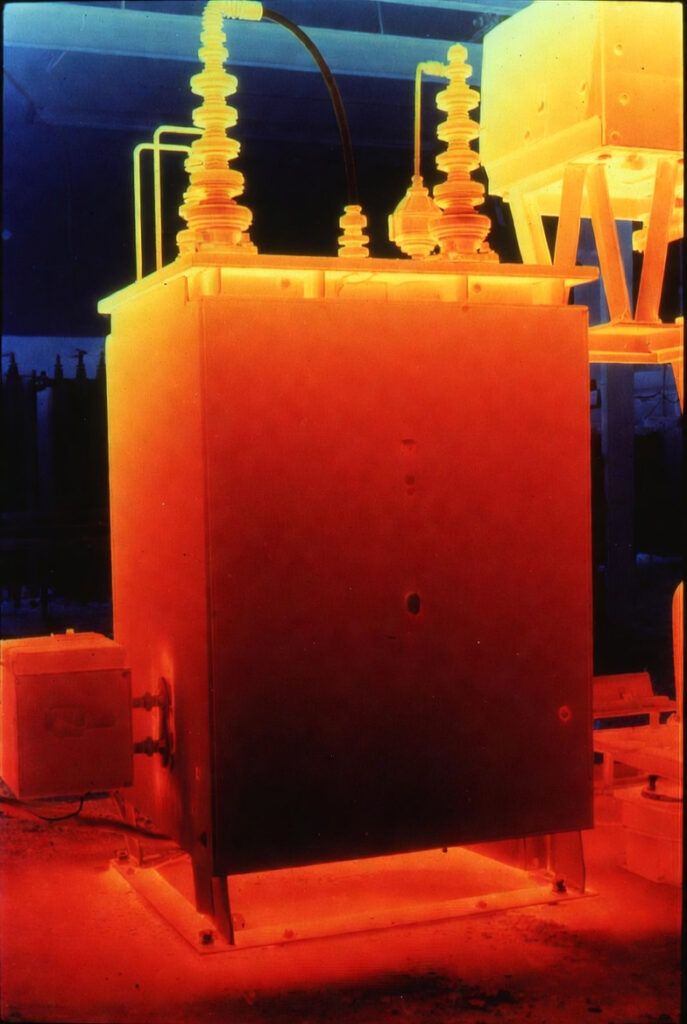
Every connection in your off-grid system is either getting cooler or hotter compared to commissioning day. You cannot see this with your eyes. Thermal imaging solar inspection makes invisible resistance visible a color-coded map showing exactly which connections are developing problems before they become failures. One scan per month under load. That is the standard that catches a 95°C connection before it becomes a fire. Before building your system understand how much solar power you actually need the system current determines how much heat a degraded connection generates.
Thermal Imaging Solar: Why Visual Inspection Is Not Enough
What visual inspection misses: A lug developing elevated contact resistance from oxidation or under-torque looks identical to a correctly functioning lug same copper color, same heat shrink, same paint pen mark. The resistance is microscopic the oxidation is inside the crimp barrel or at the lug-to-busbar interface, invisible without disassembly. The only external evidence is heat and heat is only detectable with a thermal sensor. As covered in our Busbar Torque Spec guide a correctly torqued connection runs at near-ambient temperature under load. A degraded connection generates heat proportional to its resistance and that heat is the diagnostic signal thermal imaging solar inspection captures.
The P=I²R heat signature: A connection with 0.002Ω above nominal at 200A: P = 200² × 0.002 = 80 watts concentrated at a single lug. That 80 watts raises the lug temperature above the busbar temperature the differential is the thermal imaging signature. The larger the resistance increase the larger the temperature differential. A 5°C differential at 200A indicates approximately 0.0003Ω above nominal early stage, manageable. A 30°C differential indicates approximately 0.002Ω above nominal 80 watts immediate action required.
Why the human hand is inadequate: The human hand detects temperature differences of approximately 5-10°C when touching surfaces adequate for detecting a dramatically overheating connection but inadequate for detecting the 5-7°C early-stage resistance increases that are the most valuable diagnostic targets. By the time a connection is hot enough to feel through the heat shrink and cable jacket it is already generating 40-80 watts. The degradation cascade is well underway.
The Temperature Threshold Framework
Green – normal (0-5°C above adjacent connections): The connection is operating within normal parameters. Contact resistance is at or near nominal. No action required. Document in the thermal scan log for baseline comparison.
Yellow – flag (5-15°C above adjacent connections): Elevated contact resistance detected. The connection is generating measurable heat above adjacent connections at the same current. Action: inspect at next scheduled maintenance check paint pen mark for rotation, check lug entry point for moisture or oxidation signs. Monitor at next monthly scan.
Orange – warning (15-30°C above adjacent connections): Significant resistance increase. The connection is generating 20-50 watts above nominal at typical system currents. Action: schedule disassembly and inspection within 30 days. Do not leave this connection in service through an Ontario winter without remediation.
Red – immediate action (30°C+ above adjacent connections): Active failure in progress. 50+ watts of concentrated heat at a single connection. Action: de-energize the system and inspect immediately. Do not continue operating. This connection is on the failure path the next stage is insulation degradation and potential arc ignition.
The Thermal Camera Specification – What Tool You Need
IR thermometer vs thermal camera: An IR thermometer provides adequate diagnostic capability for annual inspections of accessible connections where you know which connection to point at. It costs $30-50 and is the minimum standard for any off-grid system inspection. The limitation: it measures one point at a time and requires you to know in advance which connection to inspect. It will not reveal a hot spot you were not already looking for.
A thermal camera produces a full image of the inspection area every connection in the frame is measured simultaneously, temperature variations are color-coded, and hot spots stand out immediately regardless of which connection you were expecting to be problematic. The thermal camera finds the hot spots you were not looking for. This is the diagnostic difference.
The resolution specification:
- 160×120 pixels: adequate for identifying hot spots larger than approximately 20mm suitable for main busbar connections and large lug inspections
- 320×240 pixels: the professional standard resolves hot spots down to approximately 10mm suitable for busbar bolt identification, MC4 connector inspection, and MPPT terminal inspection
- The FLIR ONE and TOPDON budget cameras are typically 160×120 adequate for residential off-grid systems. Professional inspection cameras at 320×240 are the service-level standard for client system inspections.
The emissivity setting: Thermal cameras measure infrared radiation emitted by surfaces. Different materials emit infrared radiation at different efficiencies emissivity ranges from 0 (perfect reflector) to 1.0 (perfect emitter). Incorrect emissivity settings produce inaccurate temperature readings:
- Bare copper: emissivity 0.03-0.07 highly reflective, very difficult to read accurately
- Oxidized copper: emissivity 0.65-0.75 much easier to read
- Black heat shrink: emissivity 0.95 nearly perfect emitter the most accurate thermal imaging solar measurement surface
Measure through the heat shrink covering the lug not the bare copper lug barrel for accurate temperature readings.
The Baseline Scan – The 25-Year Comparison Standard
What a baseline scan is: A baseline thermal scan is taken at commissioning when all connections are at nominal resistance and the thermal signature represents the correct operating temperature of every connection under typical load. Every future scan is compared to this baseline. A connection that appears blue in the baseline and yellow in year 3 has increased in temperature by a measurable amount even if both scans show it within the acceptable range in absolute terms.
The baseline scan procedure:
- Energize the system and apply a representative load 50-70% of rated inverter output using the microwave, AC, or well pump
- Allow 15 minutes for the system to reach thermal equilibrium under load
- Scan every accessible connection main battery terminals, Lynx Distributor outputs, MPPT terminals, Blue Sea Systems HD 600A Disconnect contacts, Victron SmartShunt 500A terminals
- Photograph every scan label each photo with the connection name and date
- Store in the system commissioning folder Google Drive alongside the maintenance log as covered in our Off-Grid Solar Maintenance guide
I took the commissioning baseline scan on a Rockwood Fortress build last autumn every connection blue to light green on the camera at the typical 200A load. I showed the client the scan on the camera screen and explained: this is what your system looks like when everything is correct. If you scan it next October and any connection has moved from blue to yellow that is a maintenance item. If anything is orange call me before winter. He photographed the commissioning scan with his phone for backup. He understood exactly what he was looking for.
The Hot Spot Diagnostic – Finding the Invisible Fire
The monthly scan procedure:
- Apply representative load microwave plus AC or well pump simultaneously 50-70% inverter output
- Allow 15 minutes thermal equilibration
- Scan all accessible connections in sequence battery terminals, main fuse holder, main disconnect, Lynx Distributor positions, MPPT terminals, SmartShunt terminals
- Note any connection showing differential above 5°C from adjacent connections
- Photograph any flagged connections add to maintenance log with date and temperature differential
- Compare to previous scan is the differential increasing or stable?
What the Victron Cerbo GX VRM data adds: Cross-reference the thermal scan findings with VRM data. A connection showing elevated temperature in the thermal scan should correspond to a measurable voltage drop in the VRM data. The Victron SmartShunt 500A captures battery voltage at high precision voltage drop events that correlate with the thermally flagged connection location confirm the diagnostic.
I was scanning a professionally installed system last spring everything looked clean visually, paint pen marks aligned, heat shrink intact. The thermal camera showed one 4/0 AWG lug at the Lynx Power-In output running at 95°C while adjacent connections were at 33-35°C. Bright white on the camera screen unmissable in the thermal image but completely invisible to the naked eye. We shut down the system, removed the heat shrink, and found oxidation at the lug-to-busbar interface. The bolt torque was correct at 25 Nm but the mating surface had not been cleaned at installation. Cleaned both surfaces with Scotch-Brite and IPA, retorqued to 25 Nm, reassembled. Next scan: 34°C at that connection. The 95°C hot spot was gone. As covered in our Busbar Torque Spec guide torque alone does not guarantee low resistance surface preparation is the other half of the equation.
NEC 110.14 and CEC Section 12 – The Code Framework
NEC 110.14: National Electrical Code Section 110.14 requires that electrical connections be suitable for the conditions of use — including the current levels and environmental conditions of the installation. A connection generating 80 watts of resistive heat at 200A is not suitable for its purpose under NEC 110.14. The thermal imaging solar scan is the only diagnostic that confirms whether every connection in the system is maintaining its NEC 110.14 suitability over time.
CEC Section 12 – Canada: The Canadian Electrical Code Section 12 requires that electrical connections maintain their integrity for the lifetime of the installation. A connection showing progressive temperature increase in annual thermal scans from 5°C above ambient in year 1 to 20°C above ambient in year 3 is demonstrating that it is not maintaining connection integrity as CEC Section 12 requires. The thermal imaging solar scan provides the documented evidence of compliance or non-compliance.
Quick Reference – Thermal Imaging Solar Temperature Standards
| Temperature Differential | Status | Action Required |
|---|---|---|
| 0-5°C above adjacent | Normal – green | Document in scan log |
| 5-15°C above adjacent | Flag – yellow | Inspect at next scheduled maintenance |
| 15-30°C above adjacent | Warning – orange | Inspect within 30 days |
| 30°C+ above adjacent | Immediate – red | De-energize and inspect now |
| Emissivity — bare copper | 0.03-0.07 | Measure through heat shrink instead |
| Emissivity — black heat shrink | 0.95 | Most accurate measurement surface |
| Scan frequency | Monthly under load | Annual minimum – monthly preferred |
Pro Tip: Scan the system at maximum practical load not at idle. A connection at 50A load may show only 2°C differential even if it has significant resistance increase. The same connection at 200A load shows 8× the heat because heat scales with I² revealing the hot spot clearly. Run the microwave, the AC, and the well pump simultaneously before scanning. If the system cannot sustain this load for 15 minutes without overloading reduce load until stable and note the load level in the scan log for consistent comparison across future scans.
The Verdict
Thermal imaging solar inspection is the diagnostic that makes invisible resistance visible before it becomes a fire.
The monthly scan procedure:
- Apply 50-70% inverter load, allow 15 minutes thermal equilibration
- Scan all accessible connections photograph every flagged connection
- Compare to baseline, document differential and trend in maintenance log
- Any connection 15°C+ above adjacent inspect and remediate before next winter
The system that gets scanned monthly catches the 95°C hot spot at the 15°C flag stage before the insulation degrades and before the arc forms. That is the standard that achieves 25 years.
Disclosure: This article contains affiliate links. If you buy through them, GridFree Guide earns a small commission at no extra cost to you.
Questions? Drop them below.