
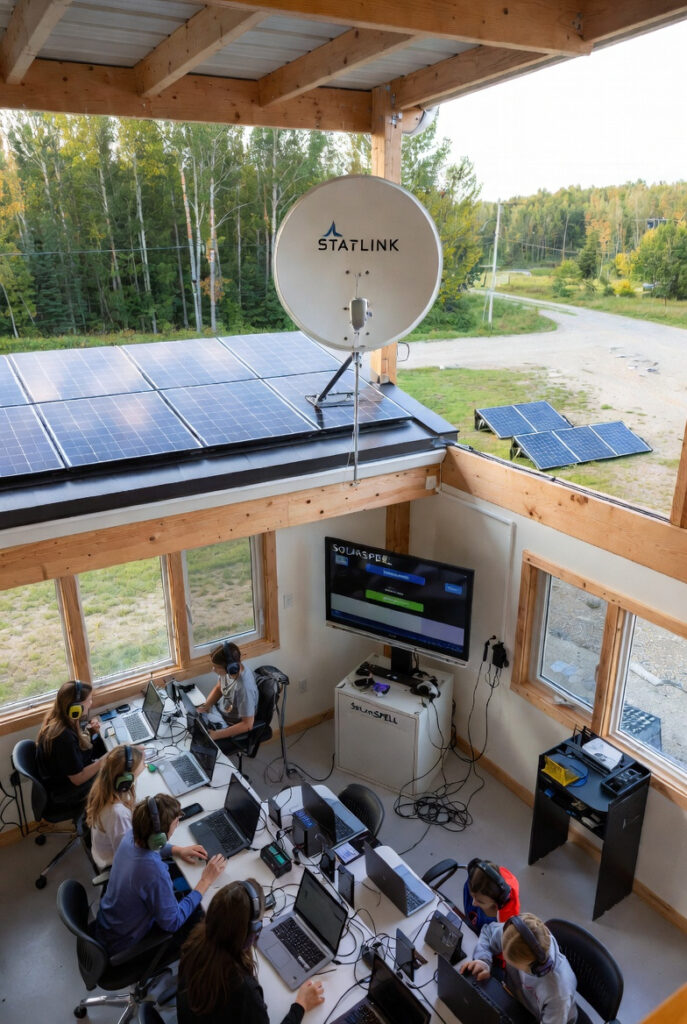
Off-grid solar for remote learning fails at 11 AM more often than it fails overnight. I visited a rural school in northern Ontario that had a functional solar system: 800W array, 5kWh battery bank, LED lighting throughout, and a Starlink dish running the office. The system ran perfectly until the school received a grant for 28 student tablets. On the first day of full tablet use the teacher plugged all 28 into a standard power strip connected to the school’s single 1,500W inverter at 11:15 AM. Each tablet charger drew approximately 25W. That is 700W of simultaneous AC load appearing on the inverter in under 30 seconds, on top of the 85W Starlink and 40W of LED lighting already running. The inverter handled the surge but the battery bank was at 62% SoC from a cloudy morning. By 1:30 PM the bank was at 28%. The inverter tripped on low voltage at 2:10 PM. The afternoon lesson ended 50 minutes early. The problem was not the solar system. The problem was 28 individual AC-to-DC charger bricks each burning 15 to 20% in conversion overhead on a battery bank that could not absorb the simultaneous load. Article 177 covers the community microgrid architecture that provides the resilience infrastructure for the whole school. This article covers the classroom technology load inside that architecture.
Why Off-Grid Solar for Remote Learning Fails at 11 AM: The Mid-Day Crash
The failure point is the mid-day amperage spike. When 28 charger bricks each drawing 25W are plugged in simultaneously, they create a 700W load appearing in under 30 seconds. The inverter can handle the surge but the battery cannot sustain the combined load through a cloudy afternoon. Each AC-to-DC charger brick converts power at 82 to 85% efficiency, meaning 840W is drawn from the inverter to deliver 700W to the devices. The DC hub solution draws 730W from the battery to deliver the same 700W. That 110W difference extends afternoon lesson time by 45 minutes on a partially cloudy day. For the full inverter tax calculation that covers why AC conversion overhead accumulates across multiple devices, the DC lighting guide covers the mechanism. For the system sizing hub that determines whether the existing battery bank can support the classroom technology load, the hub covers the load calculation foundation.
| Charging Method | Total Draw for 28 Devices | Efficiency |
|---|---|---|
| 28 individual AC bricks via inverter | 840W | 82 to 85% |
| Centralised DC USB-C PD hub | 730W | 95 to 97% |
| Saving per charging session | 110W | 13% improvement |
The DC Charging Hub: Eliminating the Inverter Tax on 28 Tablets
A centralised USB-C Power Delivery hub draws 48V DC from the battery bank and delivers 5V, 9V, 15V, or 20V to each device at 95 to 97% efficiency. No AC conversion step. No inverter overhead. No individual brick losses. A single 30-port USB-C PD hub rated for 1,200W total output handles the full classroom load from one DC connection. The staggered charging protocol eliminates the mid-day spike without reducing total charging time: Row 1 plugs in at 10:45 AM, Row 2 at 11:00 AM, Row 3 at 11:15 AM, Row 4 at 11:30 AM. Each row adds approximately 175W instead of 700W appearing simultaneously. No hardware change required. Post the charging rotation on the classroom wall and the mid-day crash does not happen.
Starlink School Day Sizing: The Off-Grid Solar for Remote Learning Communications Standard
Starlink Gen 3 draws 75 to 85W average over an 8-hour school day, totalling 600 to 680Wh. Over a 5-day school week that is 3,000 to 3,400Wh. A dedicated communications array prevents the Starlink load from competing with the classroom charging load for the same battery capacity. The dedicated array specification is 200 to 400W of additional panels feeding a separate charge controller dedicated to the communications circuit. The Renogy 100W starter kit provides the foundation for a 200W dedicated communications array. For the DC-native Starlink bypass that eliminates inverter overhead from the communications circuit, the Starlink guide covers the POE injector method that reduces the school day Starlink draw from 140W to 87W.
SolarSPELL: The Offline Library Standard for Off-Grid Solar Remote Learning
SolarSPELL is a solar-powered WiFi hotspot serving up to 50GB of curated educational content without any internet connection. Developed at Arizona State University and deployed in over 20 countries, it generates a local WiFi network with a 30-metre range, providing textbooks, videos, lesson plans, and reference materials from internal storage. In a northern Ontario classroom, during Starlink outages, weather events, or system maintenance windows, students continue accessing educational content from the offline library without interruption. The SolarSPELL unit runs on its own small internal panel and battery, independent of the school’s main solar system. It requires no configuration and no internet connection to function.
The Off-Grid Solar for Remote Learning Component Standard: DC Hubs, Starlink and SolarSPELL
The complete classroom technology standard for off-grid solar for remote learning covers five components. A 48V to USB-C PD hub rated for 1,200W minimum for a 28 to 30 device classroom. A staggered charging rotation posted on the classroom wall with four rows and 15-minute stagger intervals. A dedicated 200 to 400W solar array feeding a separate charge controller for the Starlink communications circuit. A SolarSPELL offline library unit as internet-independent educational content backup. A Victron SmartShunt monitoring display in the classroom hallway showing live battery SoC and daily production. Total additional cost to configure an existing school solar system for full classroom technology support runs $1,500 to $2,500 in components. No new battery bank is required if the existing bank is correctly sized for the base load. For the battery bank sizing calculation that confirms whether the existing bank can support the added classroom load, the sizing guide covers the math.
The Student Energy Monitor Program: The Off-Grid Solar for Remote Learning Curriculum
A teacher at a remote school near Sioux Lookout told me about the energy monitor rotation she had introduced after the solar system was installed. Each week a different student pair is assigned as the Energy Monitors. Their job is to check the battery SoC on the monitoring display each morning, record the overnight consumption, and report to the class during morning announcements. Within two months the school’s overnight battery drain had dropped by 22% as students independently started turning off lights in unused rooms, closing the gym door in winter to reduce heating load, and reminding each other to unplug devices that were fully charged. The monitoring display cost $400. The behaviour change it produced was worth more than any efficiency upgrade the school could have made to the hardware. For the full community microgrid dashboard standard that scales this concept to the whole school and community, the community solar microgrid guide covers the architecture.
NEC and CEC: What the Codes Say About Off-Grid Solar for Remote Learning Installations
NEC 406 covers receptacles and attachment plugs and requires that charging stations in educational facilities be installed with appropriate overcurrent protection and GFCI protection where required by the occupancy. A centralised USB-C PD hub installed in a classroom is a listed appliance and does not require individual outlet GFCI protection if the hub itself is listed and includes internal protection. NEC 690 governs PV source circuits and applies to any additions to the existing solar array for the dedicated communications circuit. NEC 411 covers lighting systems operating at 30V or less and is relevant to any DC-native LED lighting integrated with the classroom charging infrastructure.
In Ontario, additions to an existing solar installation including a dedicated communications array require notification to the ESA if the addition exceeds the scope of the original permit. CEC Section 64 governs PV source circuit additions. A school board adding a 200W dedicated Starlink array to an existing permitted installation should contact the local ESA district office to confirm whether a supplemental permit is required. The USB-C PD hub and charging station are consumer electronics and are not subject to CEC permit requirements when used with listed equipment. The monitoring display wiring from the SmartShunt to the classroom display is low-voltage signal wiring subject to CEC Section 16.
Pro Tip: Before the first day of tablet use, run the staggered charging test with the teacher and time the SoC drop on the SmartShunt display. If the bank drops more than 8% SoC in the first hour of charging, the charging load is too large for the existing battery bank and a sizing upgrade is needed before the school year begins.
The Verdict
Off-grid solar for remote learning configured to the classroom standard keeps the lesson running from first bell to last bell without a single inverter trip.
- Replace individual AC charger bricks with a centralised USB-C PD hub drawing directly from the 48V battery bank. The 110W efficiency recovery extends afternoon lesson time by 45 minutes on a cloudy day.
- Post the staggered charging rotation on the classroom wall. Four rows, 15-minute intervals, zero hardware changes, zero more inverter trips at 11 AM.
- Add a dedicated 200 to 400W communications array for the Starlink circuit. The school day connectivity load should never compete with the classroom charging load for the same battery.
- Install a SolarSPELL offline library unit. When the satellite goes down, the lesson does not.
In the shop, we train the next generation of apprentices. In the classroom, the solar monitoring display trains the next generation of energy-independent citizens.
This post contains affiliate links. If you purchase through our links, we may earn a small commission at no extra cost to you.
Questions? Drop them below.