
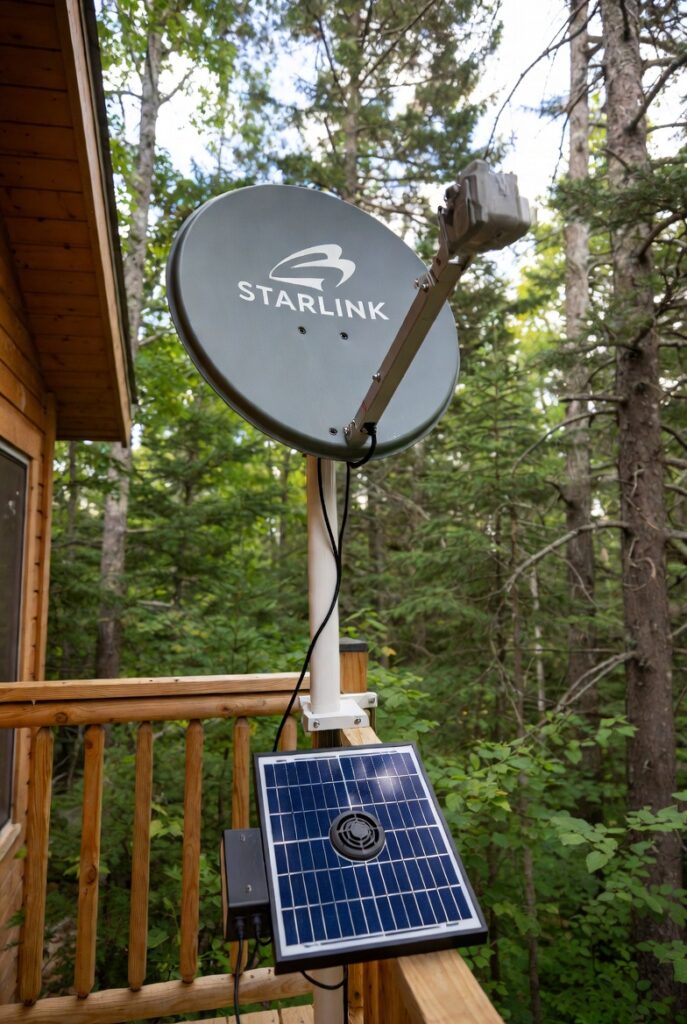
Off-grid communication forces your inverter to run 24 hours a day, whether you need anything else or not. I helped a property owner near Huntsville in Muskoka District, Ontario diagnose an efficiency problem in winter 2025. His standard Starlink Gen 2 dish pulled 85W continuous. His inverter ran 24/7 solely to power the Starlink because his family needed internet for remote work and school. His inverter’s 15W standby draw added to the Starlink’s 85W created a 100W continuous load just for connectivity.
I examined his power consumption over a typical winter week. His Starlink consumed 2.04kWh daily (85W x 24 hours). His inverter standby added 0.36kWh daily. His total communication load was 2.4kWh per day. During a cloudy January week with minimal solar production, his communication system alone consumed 16.8kWh. His 20kWh battery bank dropped to 20% SOC by day three. His off-grid communication was consuming more power than his refrigerator, lights, and water pump combined.
I helped him upgrade to a Starlink Mini with DC-native conversion. The Mini draws 25W average compared to his Gen 2’s 85W. We installed a 48V to 20V DC-DC converter that powers the Mini directly from his battery bank. His inverter now shuts down overnight when no AC loads are needed. His communication draw dropped from 2.4kWh to 0.6kWh daily. The upgrade cost $450 for the Mini and $85 for the DC-DC converter. His off-grid communication now runs on one quarter the power of his previous setup. For the load management that prioritizes communication during low battery events, The Load Management Standard covers the automation.
Why Off-Grid Communication Forces Your Inverter to Run 24/7
Off-grid communication forces your inverter to run 24 hours a day because the Starlink requires constant power for connectivity. You cannot schedule internet like you schedule a water heater. The Huntsville owner’s inverter ran continuously solely to power his Starlink.
His inverter’s 15W standby draw accumulated 0.36kWh daily just to keep the Starlink fed. His off-grid communication created a baseline load that could never be eliminated.
DC-native conversion solves this by allowing the inverter to shut down while the Starlink runs directly from batteries. The communication system operates independently of AC power entirely.
The Power Drain Problem: When Starlink Consumes More Than Your Fridge
The power drain problem exists because standard Starlink hardware is designed for unlimited grid power. A Gen 2 or Gen 3 dish draws 75W to 100W continuous depending on temperature and activity. A modern efficient refrigerator draws 40W to 60W average.
The Starlink consumes more than the fridge. Over 24 hours, that difference compounds significantly. The Huntsville owner’s Starlink at 85W consumed 2.04kWh daily.
His refrigerator at 45W consumed 1.08kWh daily. His communication system used nearly double his food preservation energy. The comparison reveals the true cost of standard satellite hardware.
Starlink Mini: The 2026 Efficiency Standard
The Starlink Mini represents a significant efficiency improvement for battery-powered installations. The Mini draws 20W to 40W depending on conditions compared to 75W to 100W for standard dishes. The integrated router eliminates the need for separate networking hardware in simple installations.
The smaller dish format uses less heating power during cold weather. The Huntsville owner’s Mini averages 25W compared to his Gen 2’s 85W. The 60W reduction translates to 1.44kWh saved daily.
The Mini’s higher monthly cost is offset by the dramatic power savings for off-grid installations. The efficiency improvement pays for itself through reduced battery stress and longer system life.
DC-DC Conversion: Bypassing the Inverter Entirely
DC-DC conversion eliminates the inverter from the communication circuit entirely. A standard Starlink uses an AC power brick converting 120V AC to the dish’s operating voltage. Running this through an inverter creates double conversion loss. Each conversion loses 10% to 15% efficiency.
A 48V or 24V to 20V DC-DC converter powers the Mini directly from batteries. A Victron SmartShunt tracks the battery drain and confirms the efficiency improvement.
The Huntsville owner’s converter cost $85 and eliminates approximately 15W of conversion losses continuously. The investment pays back within weeks through improved battery performance.
Bypass Mode: Disabling Internal WiFi for Additional Savings
Bypass mode disables the Starlink Mini’s internal WiFi radio while maintaining ethernet connectivity. The internal radio draws 5W to 10W continuously for WiFi broadcasting. If you use a separate router for better coverage or features, the internal radio is redundant.
Bypass mode turns the Mini into a pure modem. The power draw drops from 25W to 15W-20W in typical conditions. The Huntsville owner uses a GL.iNet router and runs his Mini in bypass mode.
His continuous draw dropped by 8W, saving 0.19kWh daily. Over a month, that equals 5.7kWh saved from a simple settings change. The efficiency compounds over continuous operation.
Snow Melt Management: The 175-Watt Spike You Did Not Expect
I was reviewing battery data with a property owner near Barrie in Simcoe County, Ontario after a February 2025 snowstorm. His battery SOC had dropped from 75% to 25% overnight despite minimal household use. His Starlink Mini normally drew 25W. His monitoring showed a 6-hour spike where the dish drew 175W continuously. His off-grid communication had triggered snow melt mode automatically during the storm.
I examined his Starlink app settings. The snow melt feature was set to “Auto” by default. When snow accumulated on the dish, the heating elements activated to clear the surface. The feature is designed for grid-powered installations where 175W for 6 hours is irrelevant. On his off-grid system, that 6-hour spike consumed 1.05kWh. His normal 24-hour consumption was 0.6kWh. The snow melt event nearly doubled his daily communication draw. His off-grid communication settings were wrong for battery-powered operation.
I helped him disable automatic snow melt in the app. He now triggers snow melt manually only during active storms when he can monitor battery state. A quick manual clear with a soft brush handles most accumulation without electrical heating. His overnight battery drain during storms dropped from 50% to 15%. The setting change cost nothing but saved 1kWh or more during every snow event. His off-grid communication now handles winter storms without unexpected battery drain. For the heating system that manages cabin temperature during storms, The Off-Grid Heating Standard covers the approach.
LTE Failover: 5-Watt Backup for Satellite Outages
LTE failover provides backup connectivity when satellite internet fails. Heavy storms and maintenance windows can interrupt Starlink service. A 5W LTE hub from Telus or Bell maintains essential messaging during outages.
The hub runs directly from 12V without inverter involvement. The Barrie owner added failover after losing connectivity during a winter storm. His hub costs $15 monthly for minimal data and draws 5W when active.
The failover ensures critical communication remains available regardless of satellite status. Reference CRTC for Canadian telecommunications emergency requirements.
Ethernet vs WiFi: Reducing Router Load Through Hardwiring
Ethernet hardwiring reduces router power consumption by eliminating WiFi overhead. Every active WiFi client increases router CPU load for encryption, handshaking, and packet management. The additional processing draws measurable power.
Hardwiring stationary devices like desktop computers and smart TVs removes them from the WiFi network. The router handles fewer clients with less processing overhead.
The Huntsville owner hardwired his office computer and streaming device. His router’s average draw dropped by 2W. The savings seem small but accumulate over months of continuous operation.
The Off-Grid Communication Strategy: DC-Native and Under 40 Watts
The off-grid communication strategy uses DC-native hardware with optimized settings to minimize power while maintaining 24/7 connectivity. The Starlink Mini runs directly from battery voltage through a DC-DC converter. Bypass mode disables redundant WiFi radios. Snow melt runs manually instead of automatically.
A Victron Cerbo GX enables remote monitoring over the Starlink connection. The monitoring ensures you track system performance from anywhere.
The Huntsville owner’s complete setup draws 25W average compared to his previous 100W. His off-grid communication now runs indefinitely on battery reserves that previously lasted only one day.
Planning Your Off-Grid Communication System: Components and Costs
Planning your off-grid communication system starts with measuring your current Starlink draw and identifying efficiency opportunities. If you have a Gen 2 or Gen 3 dish, the Mini upgrade provides the largest single improvement. If you already have a Mini, DC-native conversion and bypass mode maximize efficiency.
The Huntsville owner’s $535 total investment reduced daily consumption from 2.4kWh to 0.6kWh. The Barrie owner’s free settings change prevented 1kWh+ drain during every snow event.
Your off-grid communication investment pays back through reduced battery stress every day. For the battery bank that supports communication loads, The Budget Off-Grid System Standard covers the sizing.
Minimum Viable vs Full Standard: Choosing Your Efficiency Level
The off-grid communication approach offers two efficiency levels depending on your budget and power constraints. The minimum viable level costs nothing but requires accepting higher consumption. The full standard provides maximum efficiency with 24/7 reliability.
| Efficiency Level | Key Components | Cost | Daily Consumption |
|---|---|---|---|
| Minimum Viable | Settings optimization only | $0 | 1.5-1.8 kWh |
| Full Standard | Mini + DC converter + bypass + LTE | $400-$700 | 0.5-0.7 kWh |
Both off-grid communication approaches improve over default configurations. The difference is investment level and efficiency depth. The minimum viable approach works for properties with abundant solar production. The full standard suits properties where every watt matters.
Frequently Asked Questions
Q: How much power does Starlink actually use for off-grid communication?
A: Starlink power consumption for off-grid communication varies dramatically by hardware generation. A standard Gen 2 or Gen 3 dish draws 75W to 100W continuous. A Starlink Mini draws 20W to 40W depending on temperature and activity. The Huntsville owner’s Gen 2 consumed 2.04kWh daily. His Mini replacement consumes 0.6kWh daily. Your off-grid communication power budget depends entirely on which hardware you install and how you configure it.
Q: Can I run off-grid communication without an inverter running 24/7?
A: Yes, you can run off-grid communication without 24/7 inverter operation using DC-native conversion. A 48V or 24V to 20V DC-DC converter powers the Starlink Mini directly from batteries. The converter eliminates inverter involvement and its 15% conversion losses. The Huntsville owner now shuts down his inverter overnight while his Mini runs on battery power. His off-grid communication operates independently of AC power entirely.
Q: Why does my Starlink drain batteries faster during snowstorms for off-grid communication?
A: Your Starlink drains batteries faster during snowstorms because the automatic snow melt feature activates. Snow melt heating elements can spike power draw from 25W to 175W continuously until the dish is clear. The Barrie owner’s 6-hour snow melt event consumed 1.05kWh compared to his normal 0.6kWh daily total. Disable automatic snow melt in the app and clear snow manually to protect your batteries. Off-grid communication settings must be optimized for battery operation.
Pro Tip: Your off-grid communication should run on DC power whenever possible. The Huntsville owner eliminated 2.4kWh daily by bypassing his inverter with an $85 DC-DC converter. His off-grid communication now operates while his inverter sleeps. The energy saved is enough to run his fridge for an extra 12 hours. Move communication to DC-native and watch your battery reserves improve overnight.
Verdict
- The DC-Native Off-Grid Communication Standard. The Huntsville owner’s standard Starlink plus inverter standby consumed 2.4kWh daily, forcing 24/7 inverter operation and draining his 20kWh battery to 20% during cloudy weeks. His $535 investment in Starlink Mini plus DC-DC converter dropped consumption to 0.6kWh daily. His off-grid communication now runs on one quarter the power while his inverter sleeps overnight.
- The Snow Melt Management Standard. The Barrie owner’s battery dropped from 75% to 25% overnight during a single snowstorm because automatic snow melt spiked his Mini to 175W for 6 hours. Disabling automatic snow melt in the app cost nothing. His overnight storm drain dropped from 50% to 15%. Manual clearing with a soft brush handles most accumulation without electrical heating.
- The LTE Failover Redundancy Standard. A 5W LTE hub from Telus or Bell provides backup connectivity during satellite outages. The hub runs directly from 12V without inverter involvement. The $15 monthly cost ensures critical messaging remains available during heavy storms or maintenance windows when Starlink service interrupts.
This build is engineered within the 48V DC Safety Ceiling. Diagnostic logic is based on 20+ years of technical service experience. All structural and electrical installations must be verified by a Licensed Professional and comply with your Local AHJ.
This article contains affiliate links. If you purchase through these links, I earn a small commission at no extra cost to you.
Questions? Drop them below.